



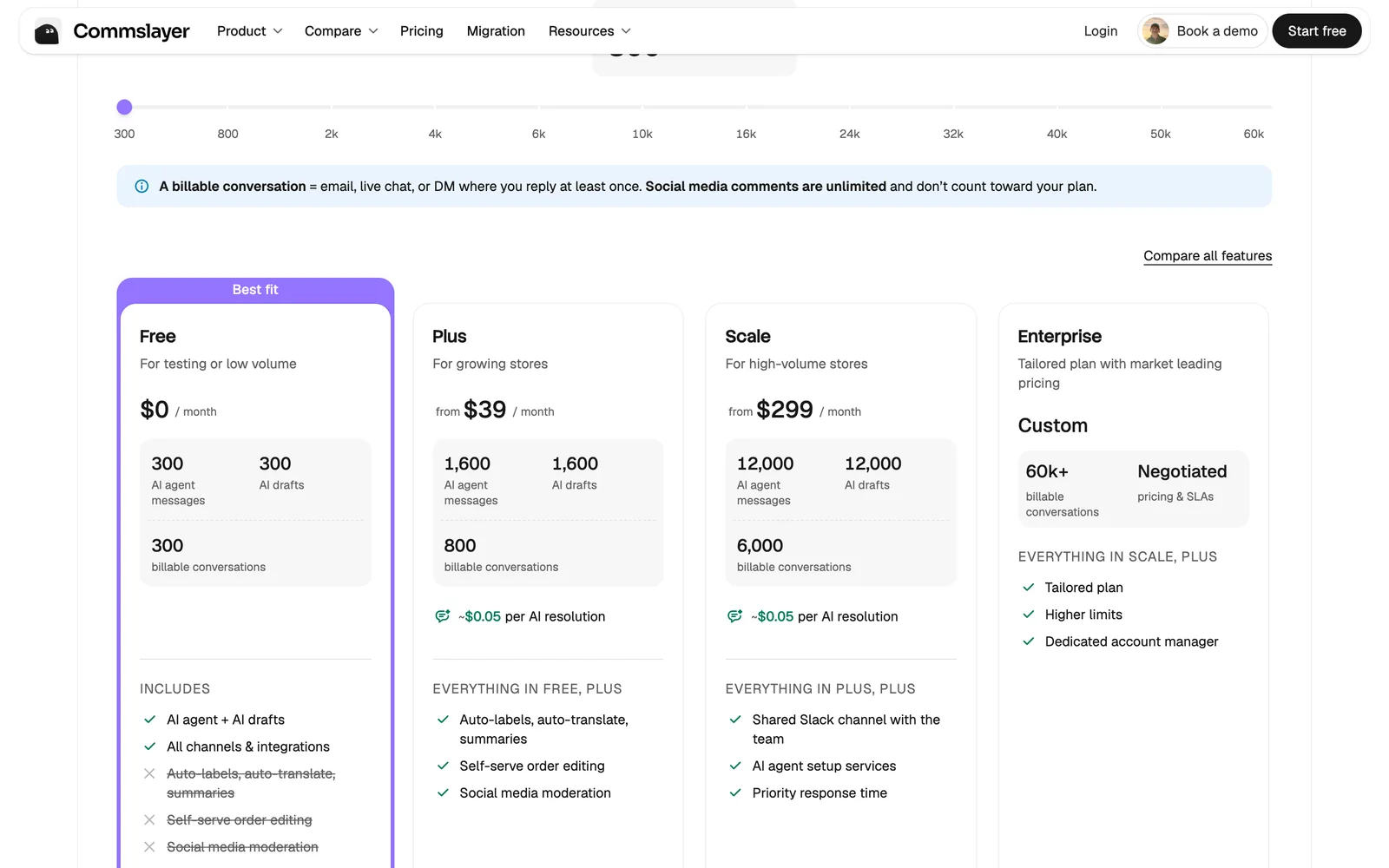
Pick Commslayer if price is the deciding factor, or if you answer customers on chat, WhatsApp, Instagram, TikTok or the phone. Its free plan covers 300 conversations a month and Plus starts at $39.
Pick Solvias if your support is email and you want a person in control: read-only store access, review mode on every category, complaints always held for you, and no AI message pool to watch.
Solvias vs Commslayer at a glance
| Compared on | Solvias | Commslayer |
|---|---|---|
| Price | ||
| Free option | 50 tickets in total, no card | 300 conversations a month, no time limit |
| Entry paid plan | €29 a month, 100 tickets | $39 a month, 800 conversations |
| How the AI is billed | Included in the ticket, no meter | Included up to a monthly pool of AI messages, then $0.075 each |
| Extra volume | €0.35 per ticket, €0.25 on Scale | $0.15 per conversation |
| Seats | Unlimited | Unlimited |
| Trial on paid plans | Free plan instead | 14 days |
| AI and control | ||
| AI drafts and auto-replies | ||
| AI can cancel, edit or refund orders | No. Read-only on your store | Yes |
| Review mode as the default | Every category starts there | Drafts for human review are available |
| Complaints and legal mail always go to a person | Not stated on its pages | |
| Funnels that check order facts before replying | Not stated on its pages | |
| List of questions your knowledge base misses | Every plan | Not stated on its pages |
| Channels | ||
| Live chat | ||
| WhatsApp, Instagram, Facebook, TikTok | ||
| Voice | Billed per minute | |
What Solvias and Commslayer cost at four volumes
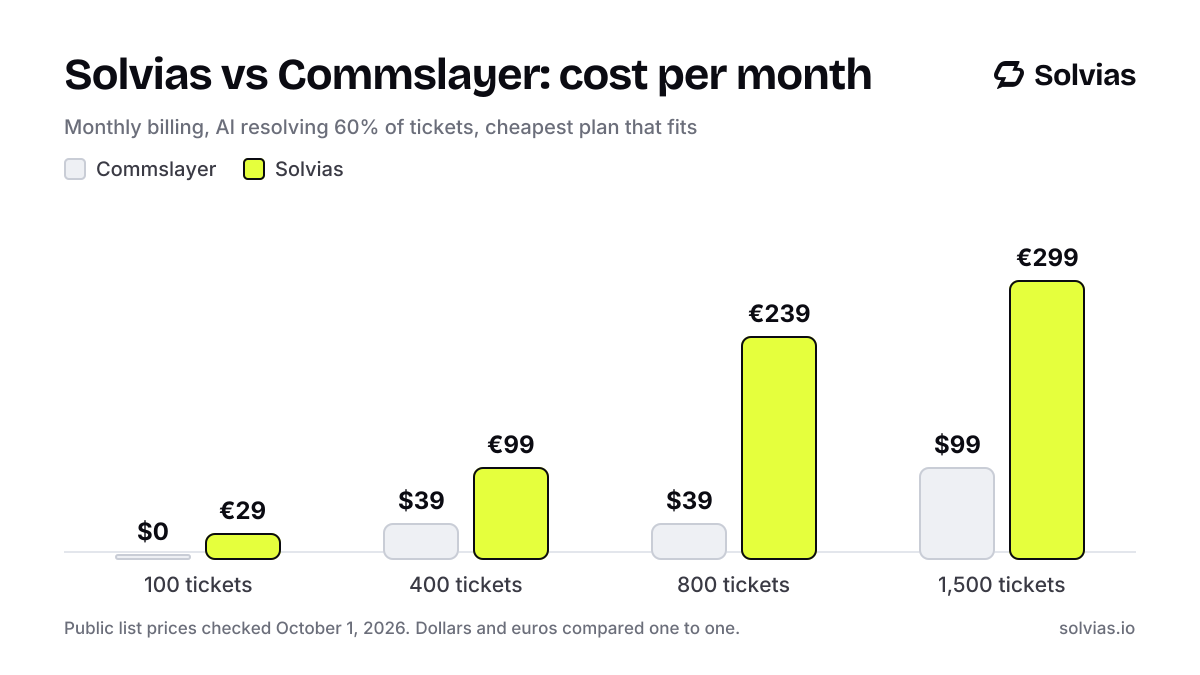
The cheapest plan that fits at each volume, monthly billing. Commslayer is cheaper at every volume we checked. We would rather show that than hide it.
| Tickets a month | Commslayer | Solvias |
|---|---|---|
| 100 | $0 Free, 300 conversations | €29 Launch |
| 400 | $39 Plus, 800 conversations | €99 Growth |
| 800 | $39 Plus, 800 conversations | €239 Growth + 400 extra |
| 1,500 | $99 Plus, 2,000 conversations | €299 Scale |
Commslayer prices from commslayer.com/pricing; the $99 tier for 2,000 conversations is from its Shopify App Store listing and is the cheapest verified tier for 1,500, checked October 1, 2026. Both plans include AI. On Commslayer the AI works from a pool of messages per month (1,600 on the 800-conversation Plus tier) and costs $0.075 per message past it.
Price: Commslayer is cheaper
There is no way around it. A store with 400 conversations a month pays $39 on Commslayer and €99 on Solvias. Below 300 a month, Commslayer is free.
Both tools include the AI in the plan, which already sets them apart from helpdesks that bill per resolution. The difference is the unit. Commslayer meters conversations and AI messages separately. Past the plan it charges $0.15 per extra conversation and $0.075 per extra AI message. You can set a spending cap, including $0.
Solvias meters one thing: the ticket you reply to. A long thread with five AI replies is still one ticket. There is no second pool to track.
What the AI may do in your store
Commslayer's AI can cancel orders, edit items, change shipping, hold fulfillment and issue refunds. If you want returns and order changes handled end to end without a person, that is a strong feature.
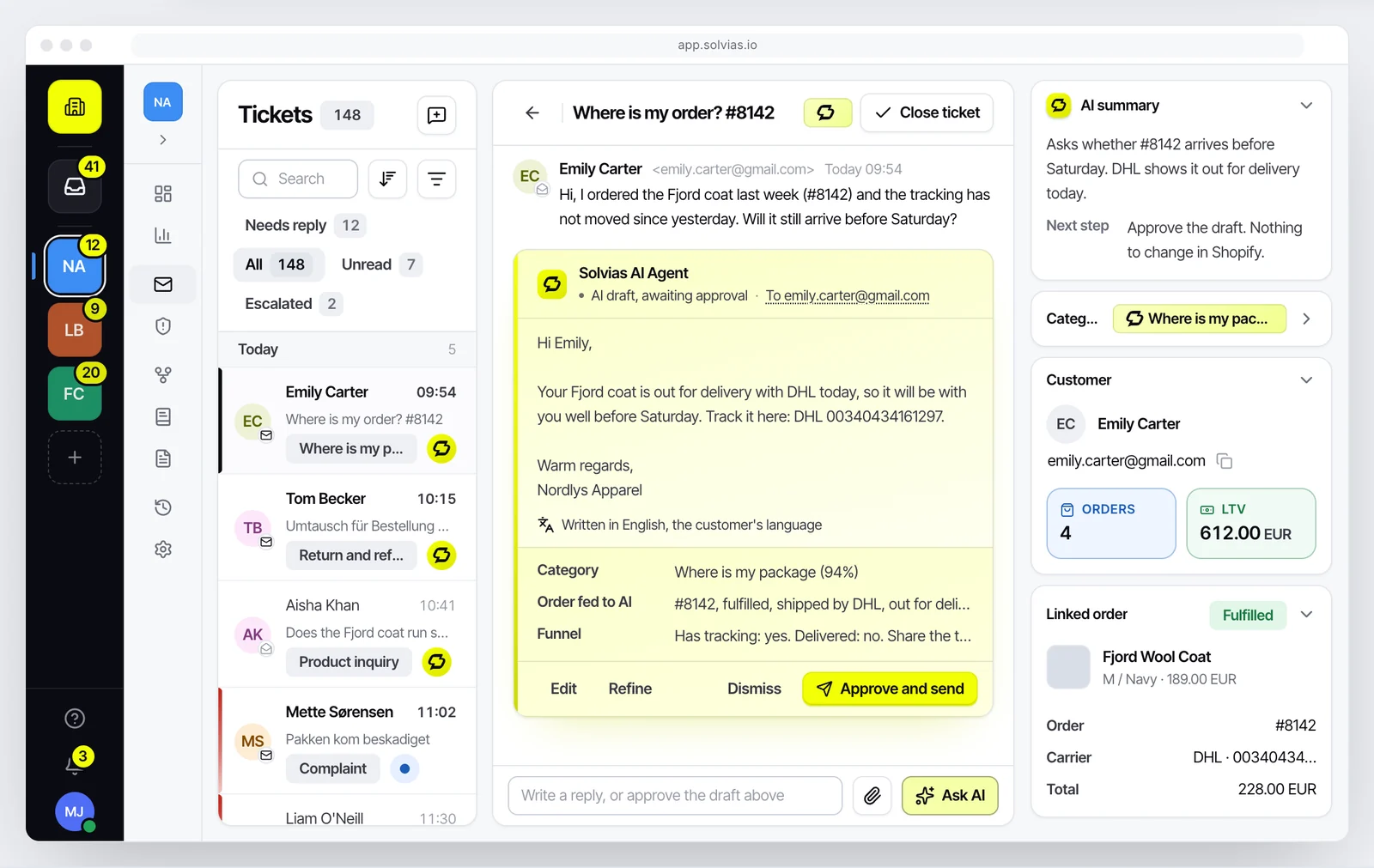
Solvias is built the other way. It has read-only access to Shopify. It reads the order, the fulfillment and the ParcelPanel tracking, and it never changes any of them. A refund or a cancellation request goes to your team with the order and a suggested reply attached.
We made that call because of our own stores. An AI that moves money saves a click. An AI that moves money wrongly costs a customer and a chargeback.
Who approves the reply
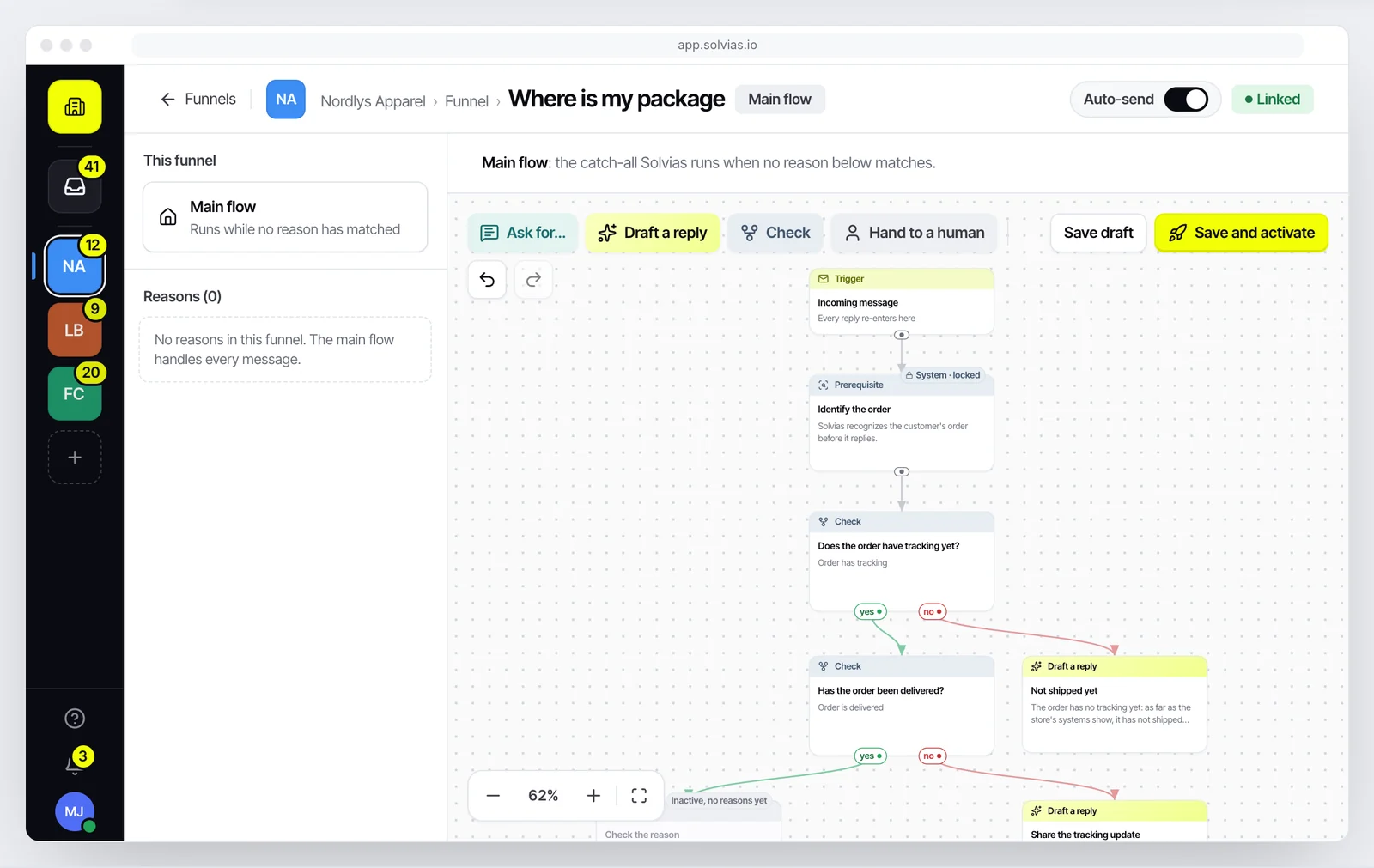
In Solvias every category starts in review mode. Solvias AI writes the draft, a person sends it. You switch on auto-send per funnel, for example where is my order, once the drafts are right week after week.
Some mail never goes out on its own: complaints and legal mail are always held for a person, whatever your settings.
Commslayer also lets the AI draft replies for review instead of sending them. Its pages don't describe a rule that always holds complaints, so we leave that cell as not stated rather than guess.
Funnels and the Gaps list
Solvias works from funnels you build per type of question. A step can check a real order fact, such as fulfilled, delivered or still inside your cancellation window, before Solvias AI writes anything. The trace on the ticket shows which check decided what.
When your knowledge base has no answer, Solvias AI hands over instead of guessing and adds the question to a Gaps list, linked to the ticket. That list is on every plan, including Free.
Channels: Commslayer covers far more
Commslayer handles email, live chat, WhatsApp Business, Instagram and Facebook DMs, TikTok and voice, with AI moderation for social comments. It also connects to subscription apps such as Recharge, Skio and Loop.
Solvias handles email only: Gmail, Outlook or any IMAP and SMTP mailbox. If half your customers message you on Instagram, Commslayer is the better fit.
Who is behind each tool
Commslayer is made by Actuals Oy, a Finnish company that builds in Boston and Helsinki. The same team built Lifetimely. Its Shopify app launched in January 2024 and holds a 4.9 rating from 233 reviews, with the Built for Shopify badge. Its privacy policy says data is primarily stored in the EU or EEA.
Solvias is ours. We are Arthur and Bryan, dropshippers and brand owners with over 30 million in revenue across our stores. We built it for our own inboxes before anyone else used it. Read our story.
Solvias or Commslayer: which one to pick
Pick Commslayer if
- The lowest monthly price matters most
- Customers reach you on chat, WhatsApp, Instagram, TikTok or phone
- You want the AI to cancel, edit and refund orders on its own
- You use subscription apps like Recharge or Skio
Pick Solvias if
- Your support is mostly email
- You want the AI to read your store, never change it
- You want every category reviewed until you choose to let it send
- You want one bill line with no AI message pool to watch
Solvias vs Commslayer: questions
Is Commslayer cheaper than Solvias?
Yes. At 400 conversations a month Commslayer Plus is $39 and Solvias Growth is €99. Under 300 conversations a month Commslayer is free.
Do both include AI in the price?
Yes, both include AI in every plan. Commslayer gives each plan a pool of AI messages and charges $0.075 per message past it. Solvias includes Solvias AI in every ticket with no separate meter.
Can Solvias refund or cancel orders like Commslayer?
No. Solvias has read-only access to your store, by design. Refunds and cancellations go to a person with the order and a suggested reply attached.
Can I try Solvias while I keep Commslayer?
Yes. Connect your support mailbox and Shopify store, and Solvias drafts in review mode without sending anything. The first 50 tickets are free.
Does Solvias do WhatsApp or Instagram?
No. Solvias handles email only. If those channels matter, Commslayer covers them.
Every number about another product on this page comes from its own public pages, checked on October 1, 2026. Prices change, so check their page before you decide. Spot something out of date? Write to info@solvias.io and we fix it.